Day 2 - Basic Linux Commands
👋 Hey there! I'm Gayatri, I have completed a degree in Computer Engineering. I am extensively involved in the fields of DevOps and Cloud computing.
➡Listing commands
ls option_flag arguments --> list the sub directories and files avaiable in the present directory
Examples:
ls -l--> list the files and directories in long list format with extra informationls -a--> list all including hidden files and directoryls *.sh--> list all the files having .sh extension.ls -i--> list the files and directories with index numbers inodesls -d */--> list only directories.(we can also specify a pattern)

➡Directoy commands
pwd--> print work directory. Gives the present working directory.cd path_to_directory--> change directory to the provided pathcd ~or justcd--> change directory to the home directorycd ---> Go to the last working directory.cd ..--> change directory to one step back.cd ../..--> Change directory to 2 levels back.mkdir directoryName--> to make a directory in a specific location

mkdir newFolder #make a new folder 'newFolder'

mkdir .NewFolder #make a hidden directory (also . before a file to make it hidden)

mkdir A B C D #make multiple directories at the same time

mkdir /home/user/Mydirectory # make a new folder in a specific location

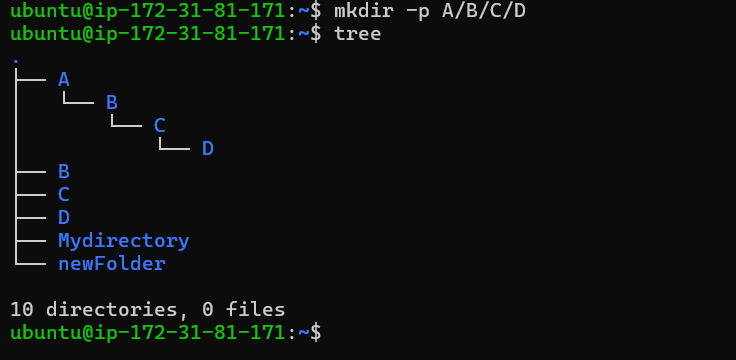
mkdir -p A/B/C/D # make a nested directory