Networking Essentials: What You Need to Know

👋 Hey there! I'm Gayatri, I have completed a degree in Computer Engineering. I am extensively involved in the fields of DevOps and Cloud computing.
What is a Computer Network?
A computer network is a group of computers and other devices (like smartphones, printers, or servers) that are connected to share information and resources. These devices communicate with each other using cables, Wi-Fi, or other connection methods.
How Does the Internet Work?
Your Device Sends a Request: When you type a website address (like google.com) or click a link, your device sends a request for that website’s data.
The Request Travels Through Networks: The request goes through a series of connected networks like Your Internet Service Provider (ISP): This is the company that provides your Internet connection, Routers: Devices that direct your request to the right place. Servers: Computers that store the website’s data. The Server Sends Back Data: Once your request reaches the correct server (where the website is stored), the server sends the data (like text, images, or videos) back to your device.
OSI Model
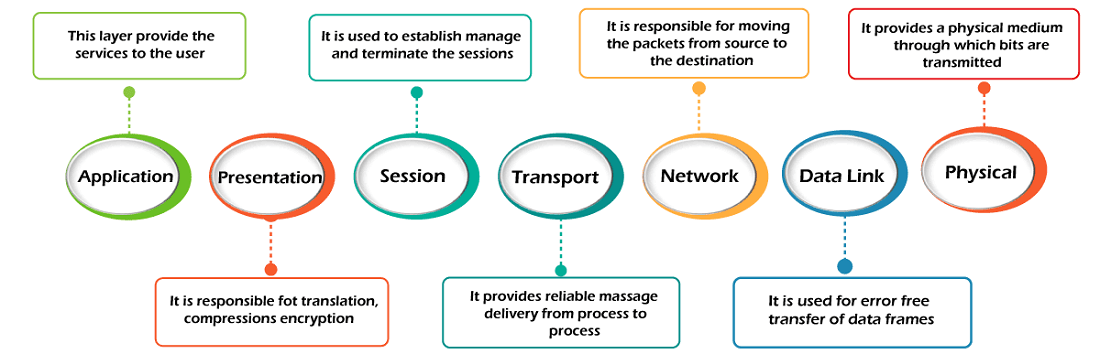
The OSI Model (Open Systems Interconnection Model) is a framework that explains how different parts of a computer network work together to send and receive data. It has seven layers.
Physical Layer
Data-Link Layer
Network Layer
Transport Layer
Session Layer
Presentation Layer
Application Layer
TCP/IP Model
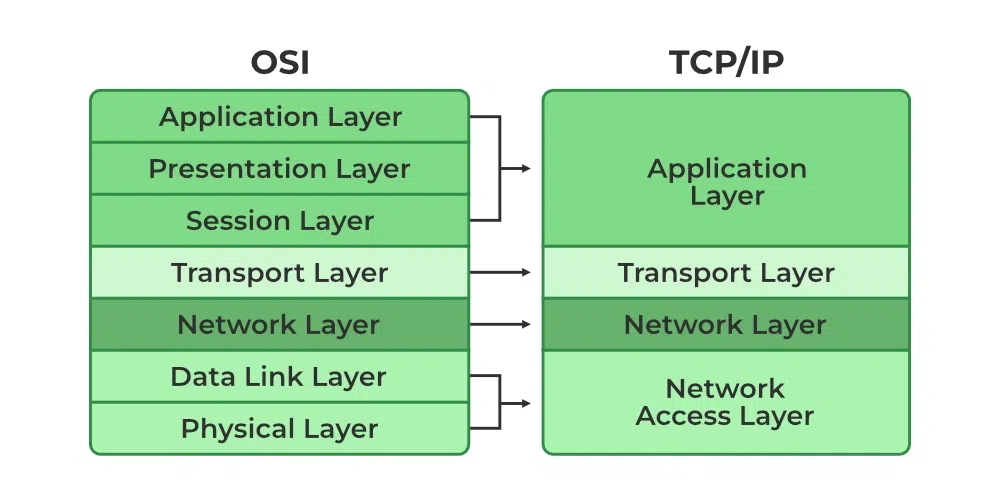
The TCP/IP Model (Transmission Control Protocol/Internet Protocol) is a simpler framework than the OSI Model. It explains how data is sent and received over the internet and other networks. It has four layers, and each handles specific tasks.
IP/Subnets
IP (Internet Protocol)
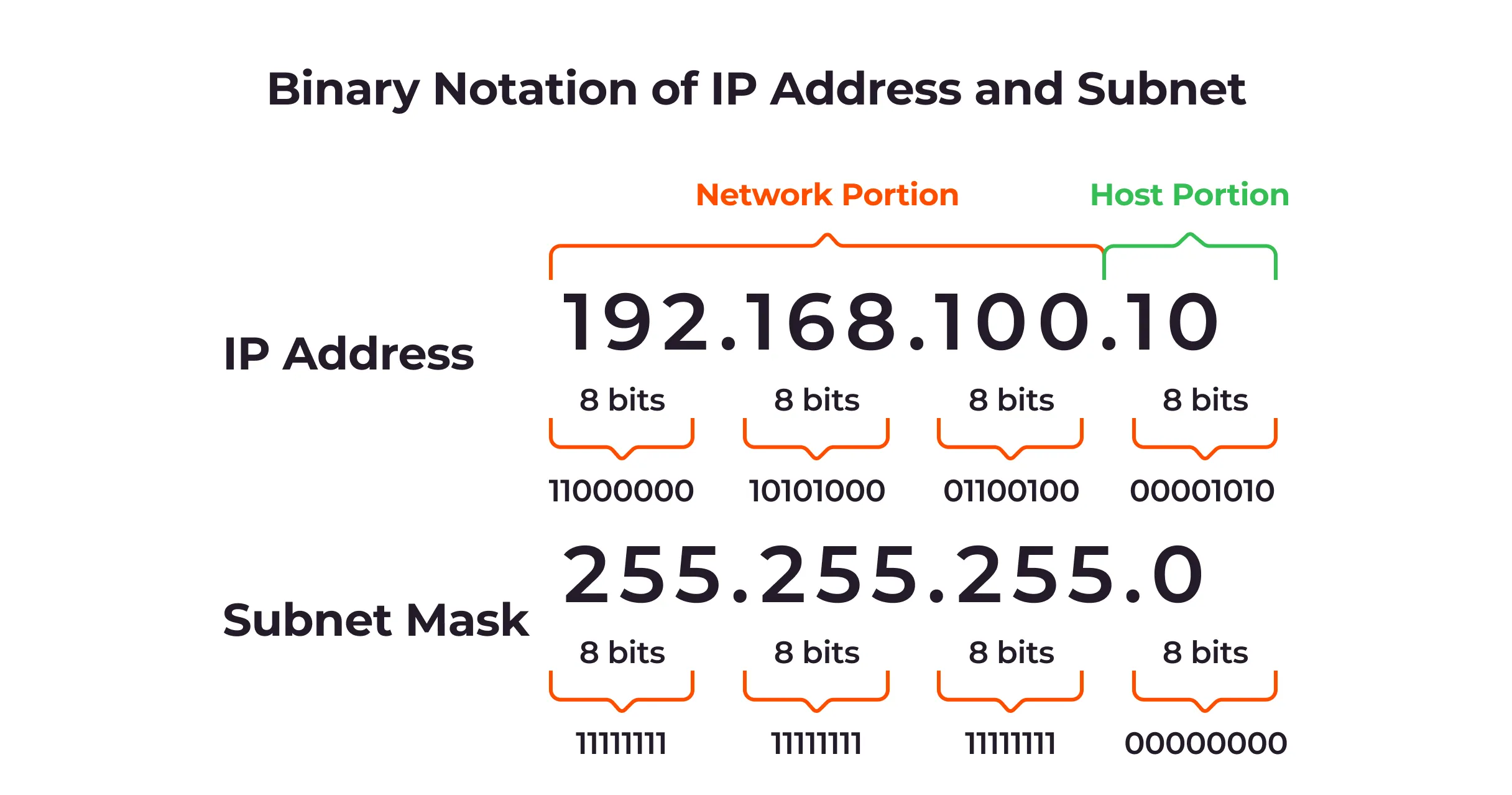
An IP address is a unique identifier for devices on a network. It works like a home address, telling data where to go and where it came from.
Types of IP Addresses
IPv4:
32 bits (4 numbers separated by dots, e.g.,
192.168.1.1).Supports about 4.3 billion unique addresses.
IPv6:
128 bits (longer format, e.g.,
2001:0db8:85a3:0000:0000:8a2e:0370:7334).Supports a massive number of addresses for the future.
Subnets
Subnets are a logical partition of an Internet Protocol (IP) network broken into multiple, smaller network segments. Subnets are often used to divide clients logically or by location to help the network traffic flow better.
DNS/NAT/Firewalls
DNS (Domain Name System)
The DNS is like the phonebook of the internet. It translates human-friendly domain names (like www.google.com) into IP addresses (like 142.250.190.14) that computers use to locate and connect to websites.
How it works:
You type a website name in your browser.
The browser asks a DNS server for the corresponding IP address.
The DNS server replies with the IP address, and your device connects to the website.
Why it’s important: Without DNS, you’d have to remember long strings of numbers (IP addresses) instead of easy-to-remember names.
NAT (Network Address Translation)
NAT is a technology that allows multiple devices on a private network (like your home Wi-Fi) to share a single public IP address to connect to the internet.
How it works:
Devices in your private network (e.g., phones, laptops) use private IP addresses.
When these devices access the internet, the NAT-enabled router replaces their private IPs with its public IP.
The router keeps track of which device requested what, so it sends the correct data back.
Why it’s important:
Conserves public IP addresses.
Adds a layer of security by hiding your private network from the internet.
Firewalls
A firewall is like a security guard for your network. It monitors and controls incoming and outgoing network traffic based on rules you set.
How it works:
It blocks or allows data packets based on security policies.
Protects your devices from unauthorized access, malware, and cyberattacks.
Types:
Hardware Firewalls: Built into routers or standalone devices.
Software Firewalls: Installed on individual devices (e.g., Windows Firewall).
Why it’s important:
Prevents hackers and malicious software from accessing your network.
Controls which applications or devices can send or receive data.
Ping/Traceroute/nslookup
1. Ping
What it does: Checks if a device (computer, server, etc.) is reachable over the network and measures the time it takes for data to travel between your device and the target.
How it works:
Sends small packets of data (ICMP Echo Request) to the target.
Waits for a response (ICMP Echo Reply).
Displays results, including time (latency) and packet loss.
Why it’s useful:
Verifies if a device or website is online.
Measures the speed of the connection.
Example:
ping google.com2. Traceroute
What it does: Shows the path (hops) data takes to reach its destination and how long each step takes.
How it works:
Sends packets with increasing "Time-to-Live" (TTL) values.
Each router along the path replies when the TTL expires.
Displays the route and time taken at each hop.
Why it’s useful:
Diagnoses where delays or failures occur in the network.
Identifies the route data takes to reach a server.
Example:
traceroute netflix.com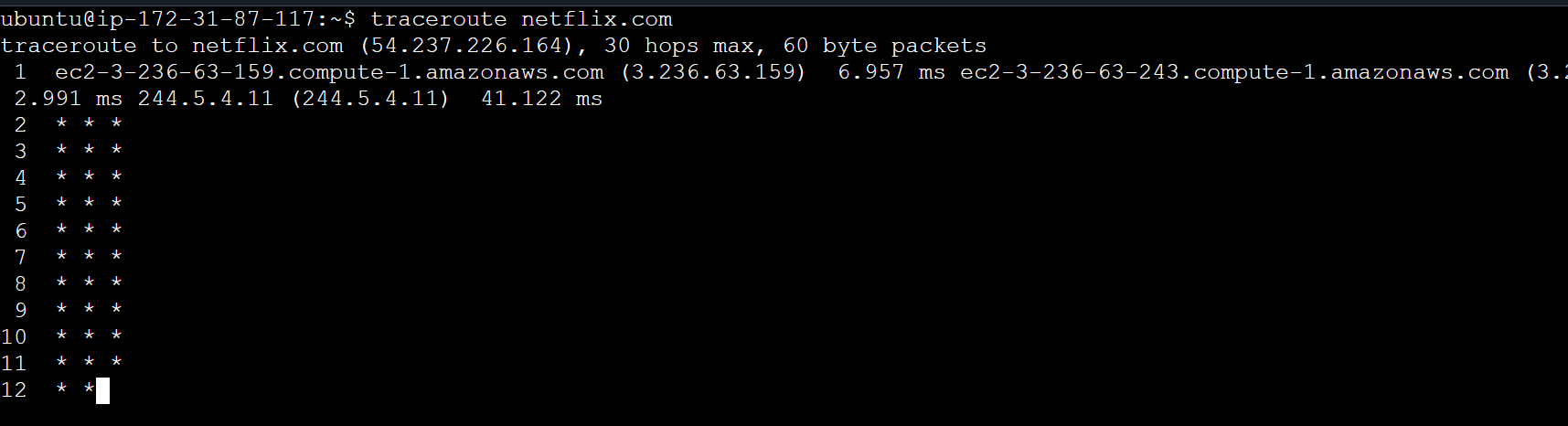
3. Nslookup (Name Server Lookup)
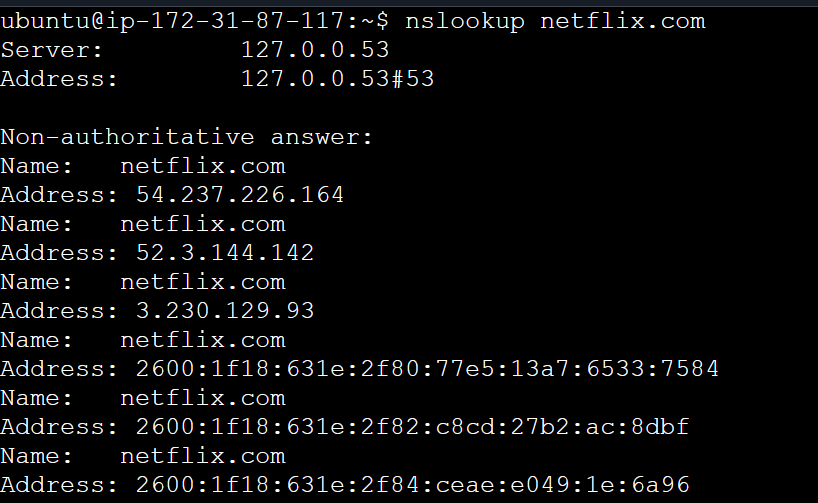
What it does: Queries DNS servers to find the IP address of a domain name or vice versa.
How it works:
Sends a request to a DNS server for information about a domain.
Retrieves the domain's IP address or other DNS records.
Why it’s useful:
Verifies DNS settings or issues.
Finds the IP address of a website.
Checks DNS record types like A (address), MX (mail), or CNAME (alias).
Example:
nslookup netflix.com
Load Balancers
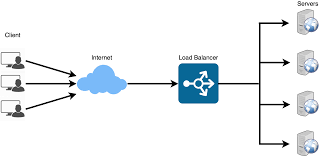
A load balancer is a tool or device that distributes incoming traffic across multiple servers to ensure no single server gets overwhelmed. It helps improve performance, reliability, and availability of applications.
Types of Load Balancers:
Hardware Load Balancers: Physical devices used in large data centers (e.g., F5, Citrix).
Software Load Balancers: Run on regular servers (e.g., Nginx, HAProxy).
Cloud Load Balancers: Provided by cloud providers (e.g., AWS Elastic Load Balancer, Azure Load Balancer).
Example
When you visit a popular website like Amazon, the load balancer ensures your request goes to an available server, even if thousands of other users are also accessing the site at the same time.